What is a shared inbox?
The definition, the look-alikes it gets confused with, what Gmail and Outlook give you free - and the honest point where a team needs more.
A shared inbox is a single email address - like support@ or hello@ - that a whole team reads and answers together from one place, without sharing a password. Each message can be assigned to one owner, discussed privately, and tracked to done, so nothing is answered twice or missed entirely.
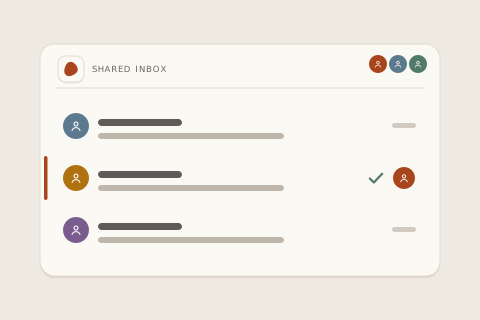
That's the whole idea. The complications - and the reason this guide exists - come from the fact that three very different things get called “shared inbox,” and the free ones quietly lack the features that make sharing an inbox safe.
Shared inbox vs shared mailbox vs distribution list
These three get used interchangeably and behave nothing alike. The difference that matters: a distribution list copies mail out to individuals; a shared mailbox gives everyone the same pile; a shared inbox keeps one thread that one person visibly owns.
| Distribution list | Shared mailbox | Shared inbox | |
|---|---|---|---|
| What it actually is | a forwarding rule | one mailbox, many logins | a team workspace |
| Where replies live | each person’s inbox | one pile, no owner | one thread, one owner |
| Who owns a message | nobody | nobody | |
| Can two people double-reply | constantly | easily | it warns you first |
| Private team discussion | - | - | |
| History when someone leaves | leaves with them | stays, unowned | stays, reassigned |
How a shared inbox actually works
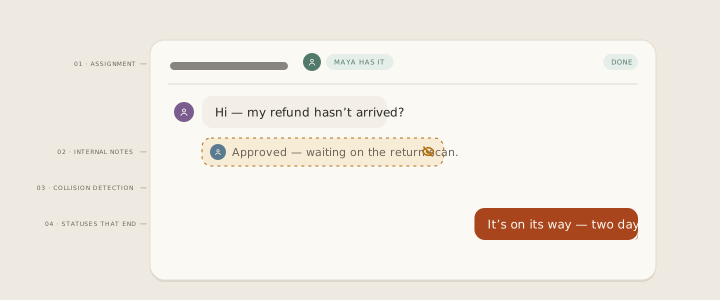
Underneath every real shared inbox tool are four mechanics. If a product is missing one of these, it's a mailbox with extra steps:
Assignment
Every conversation gets exactly one owner. “Someone will get it” becomes “Maya has it” - and the difference is the whole product.
Internal notes
The team discusses a tricky reply inside the thread, invisible to the customer, instead of forwarding fragments around.
Collision detection
When two people open the same conversation, both see it - before the customer receives two different answers.
Statuses that end
Open, waiting, done. A thread can be snoozed to a date or closed with confidence, so the inbox trends toward empty instead of toward panic.
What Gmail and Outlook give you free - and what's missing
Both suites include a free route, and for a two-person team just starting out, either can genuinely be enough. Google's is Collaborative Inbox, bolted onto Google Groups; Microsoft's is the shared mailbox in Outlook. Honest credit where due: they cost nothing, live where your mail already lives, and take an afternoon to set up.
The gaps only show up once volume does. Neither has collision detection - the double-reply problem is yours to police by shouting across the room. Assignment in Collaborative Inbox is a label with no notification and no accountability; in an Outlook shared mailbox it doesn't exist at all. There's no round-robin, no SLA timer, no analytics on what your team answered or how fast, no internal notes on a thread, and search degrades badly as the pile grows. Microsoft also caps the mailbox at 50 GB and cuts off automatic replies in ways that surprise teams later.
| Gmail Collaborative Inbox | Outlook shared mailbox | Shared inbox tool | |
|---|---|---|---|
| The eight capabilities that decide it | |||
| Price | free | free with M365 | paid |
| Real assignment with accountability | labels only | - | |
| Collision detection | - | - | |
| Internal notes on the thread | - | - | |
| Round-robin / load routing | - | - | |
| SLA timers & business hours | - | - | on better tools |
| Reporting & analytics | - | - | on better tools |
| Beyond email (chat, DMs) | - | - | |
Platform capabilities as of August 2026.
When a team needs one
Not at a headcount - at a set of symptoms. The trigger signs, from teams who made the switch:
- A customer got two different answers to one question - or none, because everyone assumed someone else had it.
- “Did anyone reply to that?” is a daily Slack message.
- Support arrives on more than one channel - email plus Instagram, plus a chat widget - and each lives in a different app.
- Someone left, and their password was the only key to a year of customer history.
- The founder still reads every message - at midnight, resentfully.
Two or three of those and the free routes are already costing more than a tool would.
How to set one up: the three routes
Route 1 - Google, free
Create a Google Group for support@, enable Collaborative Inbox in the group's settings, add your team as members with the “manage” role. Mail to the address lands in the group; members can assign-by-label and mark complete. Fine for two people at low volume; the gaps above apply.
Route 2 - Microsoft, free with 365
In the admin center, create a shared mailbox and grant your team Full Access and Send As. It appears in everyone's Outlook. You get one shared pile and a shared sent folder - workable for coverage, blind on ownership.
Route 3 - a dedicated tool
Connect your existing address (Gmail, Outlook or plain IMAP) to a shared inbox product. Mail keeps flowing through your provider; the tool adds the ownership layer - assignment, notes, collision detection, statuses - and usually the other channels too. Setup is minutes, not a migration: your address, your history, a new front end for the team.
What to look for in a tool
Buying criteria that hold up regardless of which product you pick:
- The four mechanics above, non-negotiable - especially collision detection.
- Every channel you actually use in one queue - check email and live chat minimum, and be suspicious of “coming soon” lists.
- AI with a leash you control. Drafting help is a gift; auto-sending is a policy decision. Know which one you're buying - our default is that a human approves every send, and a reply goes out unapproved only if you turn Autopilot on - even then refunds, upset customers and VIPs always stop and wait for a person.
- Pricing that survives growth. Per-seat bills double when the team does; per-ticket bills spike exactly when you're busiest. Flat pricing is the only shape that doesn't punish success.
- An exit. Full export of conversations and customers, any time, no call required.
The product section of this guide: inrelay is a shared inbox built AI-native - the agent reads, tags and drafts, your team approves - sold flat, with teammates never priced on the Team plan. If the symptoms above sound familiar, it takes minutes to try with your own inbox.
Try it with your own inbox.
Connect your existing support@ in minutes - nothing migrates, everything calms down.