inrelay vs Hiver
A help desk that lives inside Gmail against a dedicated app with AI drafts approved by default - compared straight, losses included.
 The case for Hiver
Choose Hiver if the team genuinely wants to stay inside Gmail’s interface - Hiver turns the inbox agents already live in into a help desk with near-zero onboarding.
Choose inrelay for a purpose-built Mac and Windows app with AI drafting on every reply, human approval before anything sends, and one flat price instead of per-seat billing.
The inrelay vs Hiver decision is really a decision about where support should live. Hiver’s bet is that it should live where email already is; ours is that a team inbox deserves its own app. Below: the feature matrix with gaps on both sides, where each product honestly wins, and the pricing math at three and eight people. Every claim is dated; the rest of the family lives at /compare.
Feature by feature.
Every row verifiable. Gaps are printed as gaps - ours included.
| Hiver | inrelay | |
|---|---|---|
| Platform | ||
| Dedicated desktop app | runs inside Gmail / Outlook; Omni is web | |
| Mobile app | ||
| Channels | ||
| Live chat | ||
| in development | ||
| Instagram DM | - | in development |
| SMS | voice via Aircall only | in development |
| TikTok Shop | - | in development |
| Support toolkit | ||
| Knowledge base | yes, with custom domains | |
| CSAT surveys | ||
| Collision detection | ||
| SLA rules | in development | |
| Analytics dashboards | included on Team | |
| AI | ||
| AI drafting | ||
| Human approval before AI sends | drafting is human-sent; AI Agents answer autonomously | required by default; auto mode is per-workspace opt-in |
| Pricing shape | ||
| Model | per seat, 2-seat minimum | flat plans; teammates are never priced |
Hiver features and pricing as of August 2026. Hiver’s pricing page renders in-app; verify current numbers on hiverhq.com before deciding.
Where Hiver is stronger
A comparison that never loses a category is an ad. Hiver wins these, genuinely:
- Zero learning curve for Gmail teams. Hiver installs into the inbox agents already use all day. Adoption is nearly instant - there is no new app to learn, and that matters for teams that have failed rollouts before.
- Live channel breadth today. WhatsApp is a shipping channel in Hiver’s omnichannel inbox, and voice runs through its Aircall integration. Our social channels and SMS are still in development - if you need WhatsApp this quarter, Hiver has it and we do not.
- SLAs shipped, dashboards mature. Business-hours SLA enforcement and custom dashboards are live in Hiver now. inrelay’s SLA rules are still in development - a team that manages by response-time targets today should weigh that heavily - and while inrelay’s analytics ship on the Team plan, Hiver’s dashboards are the more mature of the two.
- Years of maturity. Hiver has a decade of edge cases behind it and consistently strong review scores. inrelay is the younger product; that trade is real.
One correction to a common shorthand: Hiver is not “Gmail-only.” It was born as a Chrome-extension layer on Google Workspace, but it now supports Outlook and offers a standalone workspace, Hiver Omni. The fair description is Gmail-native first, with the other surfaces added later.
Where inrelay is stronger
An inbox extension inherits its host’s ceiling. A dedicated app sets its own.
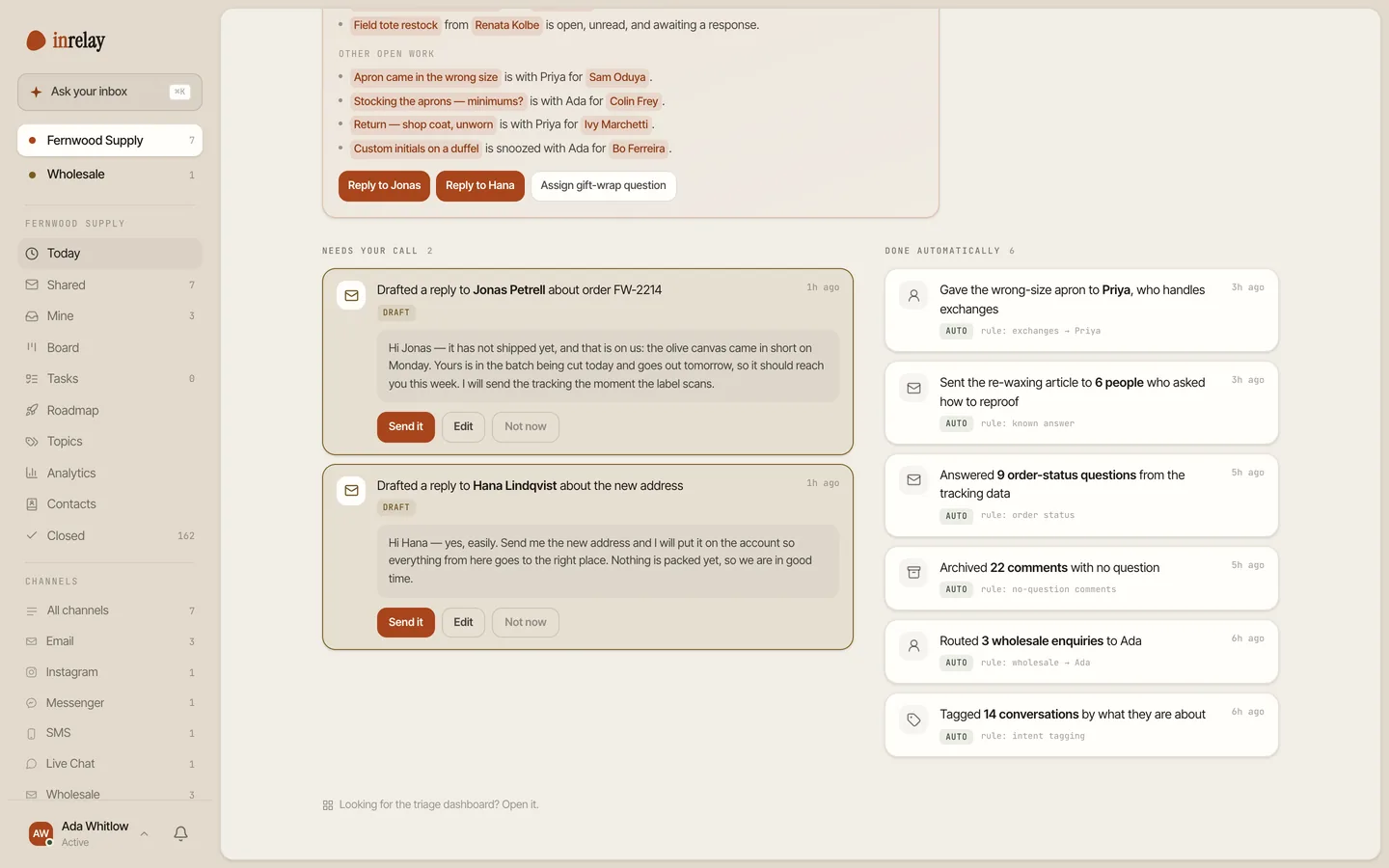
- A real desktop app. inrelay ships a dedicated Mac and Windows app built for support work - not a layer inside someone else’s inbox. Reviewers of Gmail-extension help desks repeatedly report lag and glitches at high email volume; an app that owns its own surface doesn’t fight its host.
- AI on every reply, gated by a human. The agent drafts in your voice on every conversation, and approval before send is the default - auto mode exists only as a per-workspace opt-in. Hiver’s equivalent splits between human-sent drafting and autonomous AI Agents.
- Flat pricing where teammates are never priced. Hiver bills per seat with a 2-seat minimum, seats sold in blocks, and a 10-user cap on its Growth tier - the eleventh person forces an upgrade to Pro. inrelay is flat per plan: Team includes 10 seats, Studio 25 - never priced per seat.
- No Gmail lock-in. Hiver’s value dissolves if the org ever leaves Google Workspace. inrelay connects to your address wherever it lives, and your data exports the day you want to go.
Pricing side by side.
Per-seat math at three and at eight people, against one flat number.
| Hiver Growth | Hiver Pro | inrelay | |
|---|---|---|---|
| Model | $25/user/mo annual ($35 monthly) | $55/user/mo annual | flat per account |
| Seat rules | 2-seat min, caps at 10 users | 2-seat min | teammates are never priced |
| 3-person team | $75/mo | $165/mo | $79 Team, flat - AI included |
| 8-person team | $200/mo | $440/mo | $79 Team, flat |
| AI | bundled; advanced AI gated to upper tiers | bundled | included on every plan - a monthly pool of AI credits |
| Free tier | yes (limits unpublished) | - | yes - the Solo plan, free forever, 300 AI credits a month |
Hiver prices as of August 2026, annual billing. Hiver publishes pricing only inside its app; check current numbers there before budgeting. inrelay plans: Free, $19 Solo, $79 Team, $149+ Studio - details at /pricing.
The shape matters more than the totals. Hiver’s bill also sits on top of what you already pay for Google Workspace, and it grows with every hire and every seat block. inrelay’s grows only when you choose a bigger plan.
Migrating from Hiver
Leaving Hiver is gentler than leaving most help desks, with one sharp edge.
Your email survives automatically
Because Hiver is a layer on Gmail, the mail itself never left Google. Connect the same address to inrelay and your history stays where it always was.
Export the Hiver layer before you cancel
Assignments, notes, tags, analytics and the Hiver knowledge base are Hiver data - and on cancellation Hiver permanently deletes them for the whole team. Use Admin Panel → Settings → Export data first, then cancel.
Rebuild the knowledge base
KB articles don’t transfer automatically; plan an afternoon to move them into inrelay’s knowledge base, which supports custom domains.
Also weighing alternatives more broadly? The Hiver alternatives roundup reviews the full field, and the Help Scout and Zendesk head-to-heads cover the adjacent shortlists.
Keep Gmail. Leave the extension.
Connect your address in minutes, free - your mail stays yours either way.