 Messenger channel
Facebook Messenger shared inbox - Page messages, owned
Every message to your Facebook Page becomes a conversation with an owner, notes and history - in the same shared inbox as your email.
Shipping sooninrelay’s Facebook Messenger shared inbox connects your Facebook Page so every Messenger message lands next to email as a conversation with one owner, internal notes, and AI drafts a human approves before sending. Connect the Page once; the whole team answers together, with the full thread history in view.
If you sell on Facebook, your Page’s Messenger is a support channel whether you staffed it or not. For most small teams it lives in the Meta Business Suite tab someone forgets to check, or the Pages app on whoever’s phone got the notification. Three people can read the same message and each assume another replied; nobody can see who said what to whom last month.
A Facebook Messenger shared inbox ends that ambiguity: a Page message is a thread, a thread has an owner, and the owner answers from the same queue as everything else. Messenger support in inrelay is in development - here’s how the channel works, and what Meta’s platform genuinely allows.
What you can do from the inbox
A Messenger thread is a conversation like any other in inrelay - claimed, noted, drafted, approved.
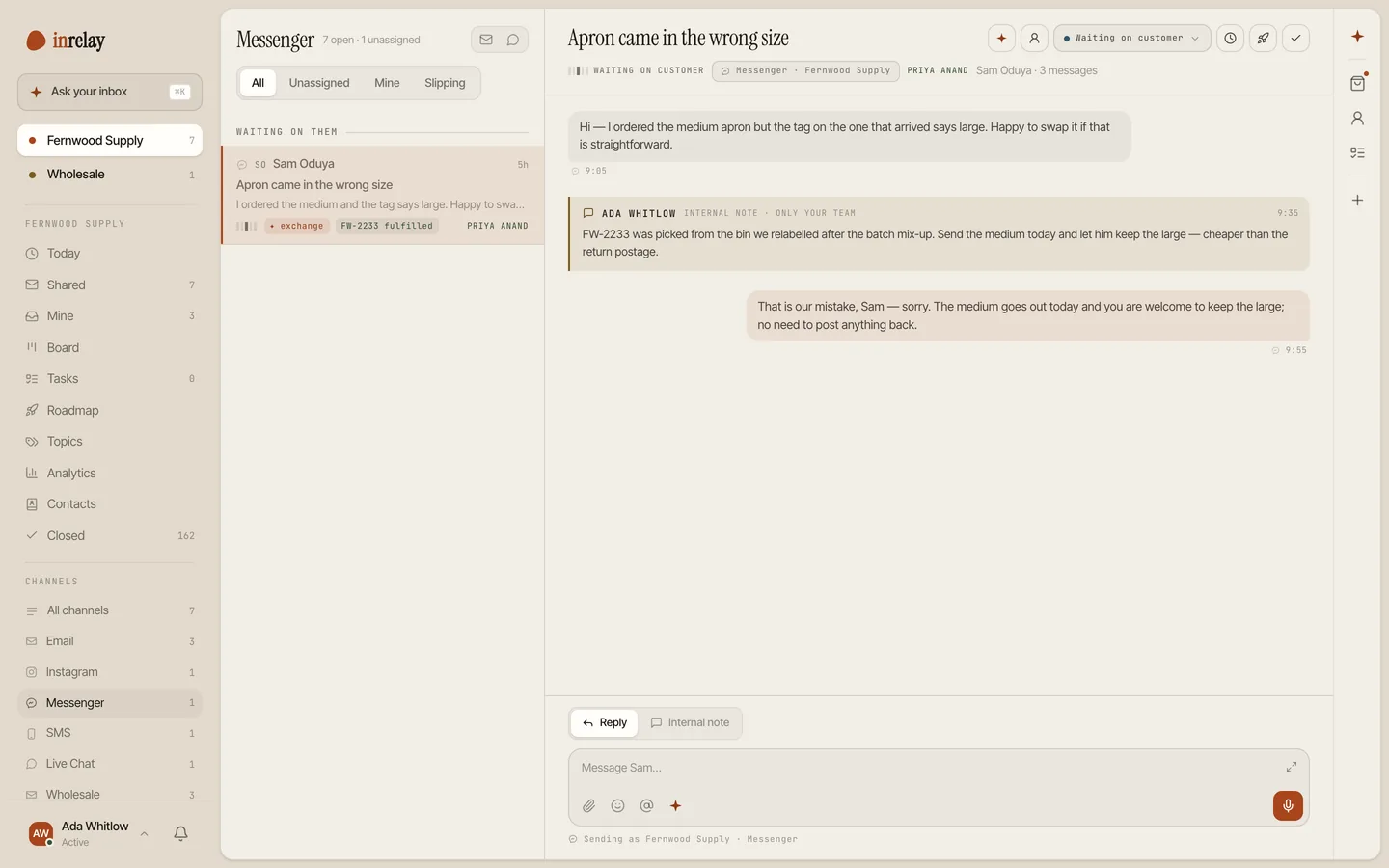
- Answer Page messages beside email, in one queue. No Business Suite tab to remember, no Pages app on one phone. A Messenger message is a conversation with a status and an owner.
- Claim without colliding. The first reply claims the thread; collision detection means the “did anyone answer this?” group chat retires.
- See the whole relationship. Messenger keeps one thread per person and Page, so the conversation carries its own history - last month’s exchange is right there for whoever picks it up today.
- Confer privately, mid-thread. Internal notes and @mentions live inside the conversation and can never post to Messenger - a note is structurally not a message.
- Send AI drafts a human approved. The AI copilot drafts in your voice; a teammate reads it and chooses to send. The approval gate applies to Messenger exactly as it does to email.
- Triage the mixed bag. Page messages arrive as everything from “is this in stock?” to complaints; triage tags intent on arrival so each lands with the right teammate.
- Answer from the couch, accountably. The mobile companion covers evenings - but the reply still comes from the team’s inbox, owned and on the record, not from a personal app.
Setup & permissions
Messenger is the lightest messaging channel to connect - no new number, no carrier registration. One Page admin and a few minutes.
Connect your Facebook Page
Someone with admin access to the Page signs in through Meta’s standard connection flow and picks the Page to connect. If an agency runs your Page, this is the one favour to ask of them.
Approve the messaging permission
The connection asks for permission to read and send your Page’s messages - that’s the job, so that’s the ask. Your Page’s posts, ads and settings stay yours; inrelay handles conversations.
Pick where threads land
Choose the workspace the Page routes into, and Messenger conversations start flowing next to email - with triage tagging them on arrival like everything else.
Agree on one home
The Page inbox in Meta’s tools keeps existing - nothing breaks. But ownership only means something if the team answers from one place, so make inrelay the home and let the old tab go unwatched with a clear conscience.
Limits, stated plainly
Messenger’s rules are set by Meta and apply to every tool that connects to a Page. These are the ones that shape how you’ll actually work.
Customers open the conversation. A business can’t start a cold Messenger thread - someone has to message your Page first. Messenger is a channel for answering the people who come to you, not a broadcast list.
There’s a reply window. Meta’s standard messaging window gives you 24 hours after a customer’s last message to respond freely. Outside it, the platform restricts what a business may send to a short list of tagged cases Meta defines - so the practical rule is simple: answer within a day, which a shared queue with owners makes normal rather than heroic.
Pages only. The channel covers Messenger conversations with your Facebook Page. Personal profiles and group chats aren’t part of Meta’s Page messaging platform, so they aren’t part of this.
Comments aren’t messages. Public comments on your posts live outside the Messenger thread, and this channel doesn’t pull them in. We’d rather tell you that here than have you discover it during a busy launch week.
With your other channels.
Messenger is one lane of the same inbox. Email and live chat ship today; the messaging channels - this one included - are in development, and we won’t claim otherwise.
Every channel
The full list of what inrelay connects today, in one omnichannel inbox.
See all channels → EMAILGmail, Outlook or IMAP as one shared support@ - where most of your volume still arrives.
Email channel → LIVE CHATLive chat
A widget on your site with a human handoff that carries the whole story.
Live chat channel → MESSAGINGWhatsApp Business conversations owned by the team, service window and all.
Shipping soon MESSAGINGSMS
Text conversations in the shared inbox, metered honestly.
Shipping soonInstagram DM
DMs as owned conversations, same assignment and approval flow.
In developmentGive every Page message an owner.
Start free with email today - Messenger lands in the same inbox when it ships. No card, never per seat.